上個月的網頁瀏覽數次數

2025年9月3日 星期三

快速助手|QuickAssist


如何快速啟動 Windows 內建【小幫手】

在遠端協助場景下,能迅速喚出「快速助手」可大幅提升遠端支援效率。

以下以 Windows 10 與 Windows 11 為例,分別說明多種啟動方式,並於最後停留在輸入協助者(小幫手)「安全性驗證碼」的畫面,等待對方(小幫手)提供驗證碼。

先決條件

  • 您的裝置必須已安裝或啟用「快速助手」應用程式

  • 網路須能連線至網際網路 Microsoft 遠端協助服務 (443/TCP)

  • 使用者端與協助端都需要 Microsoft 帳戶 (MSA) 或 Microsoft Entra ID 完成登入驗證

Windows 11 啟動方式

  • 方法一:鍵盤快速鍵

    • 按 Ctrl + Win + Q 直接呼叫快速助手


  • 方法二:開始選單

    • 點擊 Start → 所有應用程式 → 找到並開啟 Quick Assist


  • 方法三:Run 對話方塊(備用)

    • 按 Win + R,輸入 quickassist,按 Enter(若已支援)

啟動後請於「快速助手」主畫面選擇角色:

  • 若您要取得協助,請點「取得協助」。

  • 若您要提供協助,請點「提供協助」,系統將產生 6 位數驗證碼。

畫面將停留在「輸入安全性驗證碼」的欄位,請等待對方(小幫手)傳送 分享 驗證碼並請您輸入,以便彼此建立遠端安全地連線。

後續步驟提示

  • 在「輸入安全性驗證碼」階段,不要關閉視窗,直至驗證碼輸入完成並開始遠端協助。

  • 若驗證碼逾時失效,可點「重新產生」取得新碼。


Windows 10 啟動方式

  1. Run 對話方塊

    • 按下 Win + R,輸入 quickassist,按 Enter 啟動


  2. 開始選單

    • 點擊 Start → Windows 附屬應用程式 → 快速助手 (Quick Assist)


啟動後即開啟「快速助手」主程式,請選擇「取得協助」或「提供協助」,接著進入安全性驗證碼畫面。

註:『快速助手』是 Windows 10  版本1809之後,開始有的原生應用程式。它可讓您所信任的人接管您的電腦並協助您解決問題。若要開始使用,您的協助者必須啟動 [快速助手] 應用程式、隨後取得 6 位數字代碼,再與您分享該代碼。


以上流程可協助您在不同 Windows 環境中,快速呼叫並進入「快速助手」遠端協助階段。

若有其他疑問或需要進一步指引,請在本篇底下留言。

參考資料

  1. 如何使用 Windows 11 中的「快速助手」應用程式啟動快速協助

  2. 如何在 Windows 11 上使用 Quick Assist 遠端協助

  3. Microsoft Learn:「使用 [快速助手] 協助使用者」文件

  4. 如何在 Windows 10 上使用「快速助手」

  5. 延伸閱讀:使用 快速助手 遠端解決問題。

2024年4月2日 星期二

關於 Windows 進入安全模式

那就請您想辦法進去囉!


如果可進入安全模式,以下會是 『乾淨啟動』 步驟,方法如下:

1st|按下Win+R(win鍵是四個方塊的鍵)鍵;或者右擊開始圖示,選:執行


2nd|鍵入“msconfig”—按下enter,會彈出系統組態的視窗,裡面有個“服務”選項卡,點開它,一定要勾選一下最下面的“隱藏所有microsoft服務” 。


3rd|然後把剩下的非出廠軟體的服務都禁用(把intel或amd或nvidia開頭的點擊打勾,若有一個waves開頭的音訊軟體也打鉤),把每個項目前的勾勾取消就是禁用那個服務了。 然後點擊“確定”儲存。


`結束但不要重新啟動,繼續完成以下powershell程序`

繼續嘗試以下修復系統:

右鍵點擊開始圖示,打開Windows powershell(管理員)(A),或打開:windows終端(管理員),然後在命令提示視窗中直接鍵入:

sfc /scannow


(“c”和“/”之間有個空格),然後enter鍵按一下 。等待驗證完百分百,即可關閉視窗~

`等驗證100%後即可重啟了`


#Step3

最後,重啟電腦回到正常系統內看看顯示是否正常了。


#SafeMode

##更新Win10至21H1版本12小時後發生輸入帳密可進入桌面但不顯示!

                            Why FQDN ?

1st.|FQDN的意思是Fully Qualified Domain Name,即完全限定域名。它是一個在DNS中可以唯一識別特定網站、主機或其他網路設備的名稱。


2nd.|使用FQDN可以確保網路服務的可靠性和穩定性,因為它可以防止名稱衝突和網路設備的競爭。此外,使用FQDN還可以提高連接實例的可讀性和易於記憶。


3rd.|FQDN是由國際互聯網工程任務組(IETF)所提出和推廣的。


4th.|主機短名是DNS中用來表示主機名稱的簡短名稱,通常只包含主機名稱本身,而不包含完整的域名。例如,主機名稱是"server01.domain.com",它的主機短名可以是"server01"。


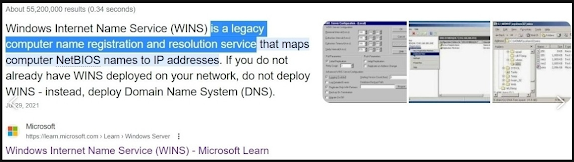
5th.|主機短名可以與WINS服務有關,因為WINS是微軟Windows平台上的一個名稱解析服務,用於將NetBIOS名稱解析為IP地址。在WINS中,可以使用主機短名來標識和解析網路主機。


6th.|WINS是由 Microsoft 公司所倡議和推廣的。


#WINS

#FQDN

#技術債


https://learn.microsoft.com/en-us/windows-server/networking/technologies/wins/wins-top


2024年1月8日 星期一

L5520從Windows 10升級到11後,請留意的提示訊息(磁碟有風險、Intel Optane)

 Latitude 5520 從 Windows 10 自主升級到 Windows 11 後,經常出現以下警告提示訊息..

請注意 您的其中一個磁碟有風險..、Intel Optane ..


透過 appwiz.cpl 可以透過搜尋找尋相關字串 Dell、intel、Optane 等字串 
確認對應的軟體版本


可透過以下URL進行 intel的驅動和硬碟韌體也可以自主下載、安裝:

Intel:https://dl.dell.com/FOLDER09445327M/3/Intel-Rapid-Storage-Technology-Driver-and-Application_88DXV_WIN64_18.7.6.1010_A05.EXE

硬碟:https://dl.dell.com/FOLDER09154344M/1/Samsung-PM991A-PCIe-NVMe-Solid-State-Drive-Firmware_NTJKM_WIN64_2630.4039_A00.EXE


2024年1月1日 星期一

郵件安全指標

郵件安全的指標中的 DMARC、DKIM、SPF 

•DMARC 是 Domain-based Message Authentication Reporting and Conformance 的縮寫(基於網域的消息身份驗證報告和一致性),是一種告訴接收郵件伺服器如何處理 SPF 和 DKIM 檢查失敗的郵件的機制。

https://www.cloudflare.com/zh-tw/learning/email-security/dmarc-dkim-spf/

https://www.cloudflare.com/learning/email-security/dmarc-dkim-spf/

Ref. https://www.agari.com/blog/pros-cons-dmarc-reject-vs-quarantine


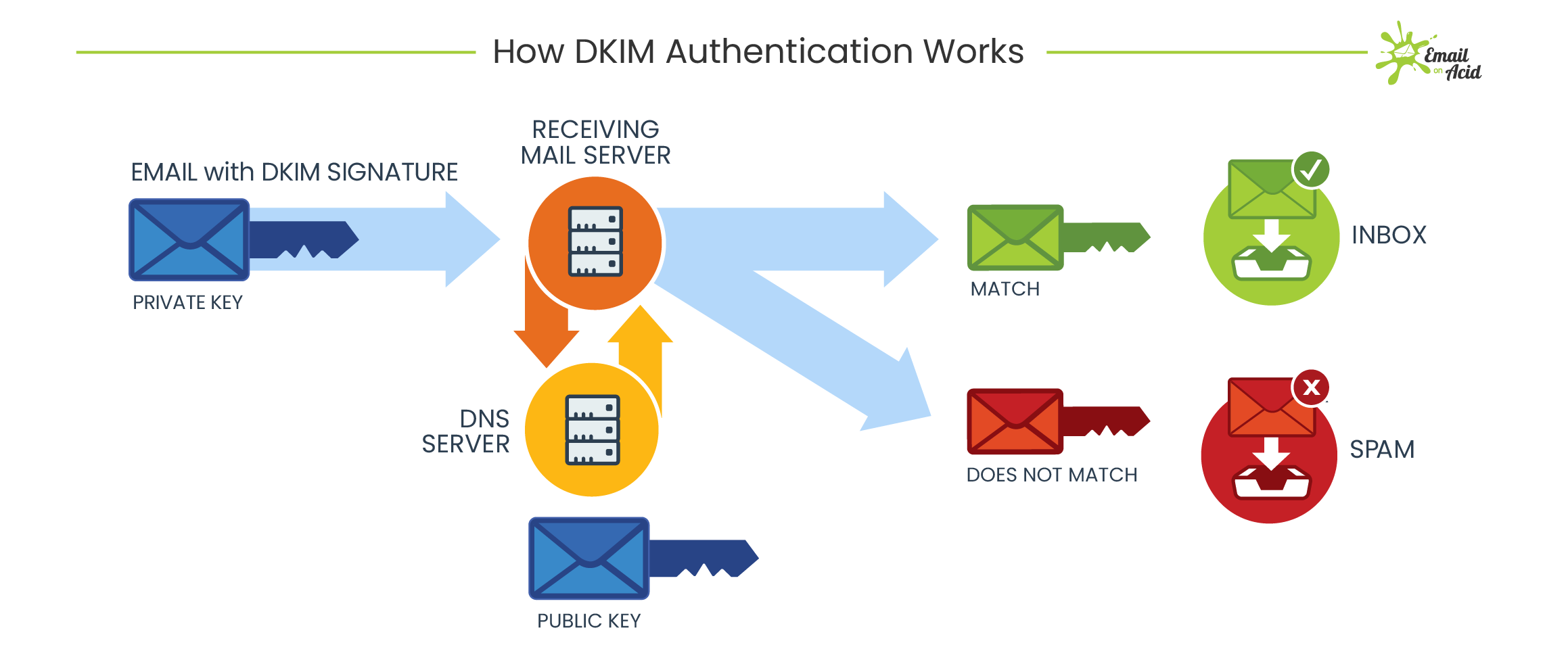
•DKIM 是 DomainKeys Identified Mail 的縮寫(網域名稱金鑰識別郵件),是一種讓網域擁有者自動簽署郵件的機制,使用公開金鑰加密技術來驗證郵件的來源和完整性。

https://www.cloudflare.com/zh-tw/learning/email-security/dmarc-dkim-spf/

https://www.cloudflare.com/learning/email-security/dmarc-dkim-spf/

Ref. https://www.emailonacid.com/blog/article/email-deliverability/what_is_dkim_everything_you_need_to_know_about_digital_signatures/


•SPF 是 Sender Policy Framework 的縮寫(寄件者政策框架),是一種讓網域擁有者列出所有可以發送郵件的伺服器的機制,用於防止偽造發件人地址的垃圾郵件。

https://www.cloudflare.com/zh-tw/learning/email-security/dmarc-dkim-spf/

https://www.cloudflare.com/learning/email-security/dmarc-dkim-spf/


2023年12月20日 星期三

類備份

 https://learn.microsoft.com/zh-tw/sysinternals/downloads/disk2vhd

大推...|好用的公用程式|借力使力 避開爭議、免付費、免安裝 

#類備份

以下是使用 Disk2vhd 的步驟:

1st|下載 Disk2vhd 公用程式。

2nd|執行 Disk2vhd 公用程式。|同意EULA條款...

===== This is the dividing line =====

3rd|選擇您想要轉換的實體磁碟區。

4th|指定要建立 VHD 的名稱和位置。

5th|選擇一個足夠大的位置來存儲您正在創建的 VHD。

===== This is the dividing line =====

6th|建立一個新的 VM,並將 VHD 添加到 VM 的配置中作為 IDE 磁碟。

7th|在首次啟動時,VM 會檢測 VM 的硬件並自動安裝驅動程序,如果驅動程序存在於映像中。如果所需的驅動程序不存在,請通過 Virtual PC 或 Hyper-V 集成元件安裝它們。

8th|您也可以使用 Windows 7 或 Windows Server 2008 R2 的 Disk Management 或 Diskpart 工具附加到 VHD。如果您打算從 VHD 引導,請勿在創建它們的同一系統上附加到 VHD。如果這樣做,Windows 將為 VHD 分配新的磁碟簽名,以避免與 VHD 的源磁碟的簽名發生衝突。Windows 通過磁碟簽名在啟動配置數據庫 (BCD) 中引用磁碟,因此當發生這種情況時,以 VM 引導的 Windows 將無法找到啟動磁碟。

===== This is the dividing line =====

9th|Disk2vhd 不支持啟用 Bitlocker 的磁區的轉換。如果您希望為此類磁區創建 VHD,請關閉 Bitlocker,並等待該磁區完全解密。

10th|Disk2vhd 可在 Windows Vista、Windows Server 2008 及更高版本上運行,包括 x64 系統。

2023年12月19日 星期二

7-zip vulnerability analysis

Reference from www.cvedetails.com


#7-zip


This page lists vulnerability statistics for all products of 7-zip. Vulnerability statistics provide a quick overview for security vulnerabilities related to software products of 7-zip. You can view products or security vulnerabilities of 7-zip products.


This page lists vulnerability statistics for all products of 7-zip. 

Vulnerability statistics provide a quick overview for security vulnerabilities related to software products of 7-zip. 

You can view products or security vulnerabilities of 7-zip products.


CVE Published Last Update Max CVSS Base Score EPSS Score CISA KEV Added Public Exploit Exists Summary

CVE-2023-31102 2023-11-03 2023-11-20 7.8 0.05% Ppmd7.c in 7-Zip before 23.00 allows an integer underflow and invalid read operation via a crafted 7Z archive.


CVE-2022-47069 2023-08-22 2023-08-26 7.8 0.05% p7zip 16.02 was discovered to contain a heap-buffer-overflow vulnerability via the function NArchive::NZip::CInArchive::FindCd(bool) at CPP/7zip/Archive/Zip/ZipIn.cpp.


CVE-2022-29072 2022-04-15 2022-04-25 7.8 0.14% ** DISPUTED ** 7-Zip through 21.07 on Windows allows privilege escalation and command execution when a file with the .7z extension is dragged to the Help>Contents area. This is caused by misconfiguration of 7z.dll and a heap overflow. The command runs in a child process under the 7zFM.exe process. 

NOTE: multiple third parties have reported that no privilege escalation can occur.

CVE-2018-10172 2018-04-16 2019-10-03 8.8 0.04% 7-Zip through 18.01 on Windows implements the "Large memory pages" option by calling the LsaAddAccountRights function to add the SeLockMemoryPrivilege privilege to the user's account, which makes it easier for attackers to bypass intended access restrictions by using this privilege in the context of a sandboxed process.

CVE-2018-10115 2018-05-02 2020-08-24 7.8 9.49% Incorrect initialization logic of RAR decoder objects in 7-Zip 18.03 and before can lead to usage of uninitialized memory, allowing remote attackers to cause a denial of service (segmentation fault) or execute arbitrary code via a crafted RAR archive.

CVE-2018-5996 2018-01-31 2019-10-03 7.8 1.34% Insufficient exception handling in the method NCompress::NRar3::CDecoder::Code of 7-Zip before 18.00 and p7zip can lead to multiple memory corruptions within the PPMd code, allows remote attackers to cause a denial of service (segmentation fault) or execute arbitrary code via a crafted RAR archive.

CVE-2017-17969 2018-01-30 2019-03-21 7.8 0.47% Heap-based buffer overflow in the NCompress::NShrink::CDecoder::CodeReal method in 7-Zip before 18.00 and p7zip allows remote attackers to cause a denial of service (out-of-bounds write) or potentially execute arbitrary code via a crafted ZIP archive.

CVE-2016-9296 2016-11-12 2016-11-29 7.5 0.18% A null pointer dereference bug affects the 16.02 and many old versions of p7zip. A lack of null pointer check for the variable folders.PackPositions in function CInArchive::ReadAndDecodePackedStreams in CPP/7zip/Archive/7z/7zIn.cpp, as used in the 7z.so library and in 7z applications, will cause a crash and a denial of service when decoding malformed 7z files.

CVE-2016-7804 2017-05-22 2017-06-01 7.8 0.55% Untrusted search path vulnerability in 7 Zip for Windows 16.02 and earlier allows remote attackers to gain privileges via a Trojan horse DLL in an unspecified directory.

CVE-2016-2335 2016-06-07 2019-03-21 8.8 1.20% The CInArchive::ReadFileItem method in Archive/Udf/UdfIn.cpp in 7zip 9.20 and 15.05 beta and p7zip allows remote attackers to cause a denial of service (out-of-bounds read) or execute arbitrary code via the PartitionRef field in the Long Allocation Descriptor in a UDF file.

CVE-2016-2334 2016-12-13 2017-12-03 9.3 0.84% Heap-based buffer overflow in the NArchive::NHfs::CHandler::ExtractZlibFile method in 7zip before 16.00 and p7zip allows remote attackers to execute arbitrary code via a crafted HFS+ image.

CVE-2015-1038 2015-01-21 2017-09-08 5.8 2.45% p7zip 9.20.1 allows remote attackers to write to arbitrary files via a symlink attack in an archive.

CVE-2008-6536 2009-03-30 2017-08-17 10.0 0.73% Unspecified vulnerability in 7-zip before 4.5.7 has unknown impact and remote attack vectors, as demonstrated by the PROTOS GENOME test suite for Archive Formats (c10).

CVE-2007-4725 2007-09-05 2020-09-17 6.8 11.62% Stack consumption vulnerability in AkkyWareHOUSE 7-zip32.dll before 4.42.00.04, as derived from Igor Pavlov 7-Zip before 4.53 beta, allows user-assisted remote attackers to execute arbitrary code via a long filename in an archive, leading to a heap-based buffer overflow.